MARS - Architecture Overview
MARS is an advanced multitrack audio recording system designed to enable professional multitrack recording in a system-agnostic environment. MARS can be installed on any local computer or on a remote cloud or dedicated server. It is accessed and operated by a web browser and requires no additional tools or software to record, edit, archive, or mix down an existing project.
Additional audio components, such as multichannel audio interfaces and audio routing software, extend the system's capabilities and allow MARS to connect to existing pro audio equipment.
MARS integrates the following major components:
1 - Multitrack Audio Playback Engine
A dual-rail, timeline-driven audio engine that handles all audio scheduling, routing within the system, and the allocation and management of audio graph resources.2 - Multitrack Audio Recording Engine
Manages continuous multitrack audio recording, buffer storage, format conversions, server uploads, and file saving mechanisms.3 - Audio Bouncing Engine
Renders audio clips and their edits into new standalone audio files, handling format conversion, server uploads, and saving both audio and session data.4 - Editing Functionality and Edit History
Provides non-destructive multiclip and multitrack editing, including edit tools, history, navigation, and edit traceability. Additionally, edit history tracks all changes to track and clip volumes, panning, limiter settings, and input/output routing adjustments.5 - Main UI, Navigation, and Location Markers
Responsive UI that renders the main project layout and scales down to 480x320px without losing or hiding functionality. The main UI component enables navigation within and between projects, manages zooming and scaling of audio tracks, clips, and waveforms, automatic paging and scrolling, in-play animations, VU meters, and all other user interface panels and editing tools, including buttons.Location markers and the location-marker side panel enable instant project navigation, playhead positioning, and management of location markers.
6 - Import/Export/Mix Down Functionality
Manages project and file imports/exports. The built-in Mix Down functionality enables export of reference mixes in various formats and sample rates.7 - System Settings
System, playback, recording, graphics, and user interface settings are managed through the Settings panel, enabling per-project optimization of system performance and user experience.8 - System Utilities
A set of tools for manual project maintenance, including rebuilding waveforms, deleting unused audio, and temporary backup files.9 - I/O Browser Routing Bridge
Stand-alone, platform-specific, optionally installable component that routes individual channels from multichannel audio interfaces to browser-compatible, standard I/O devices.10 - Installer
A manual, step-by-step text-based installation guide or a platform-specific consumer installer for complete system installation.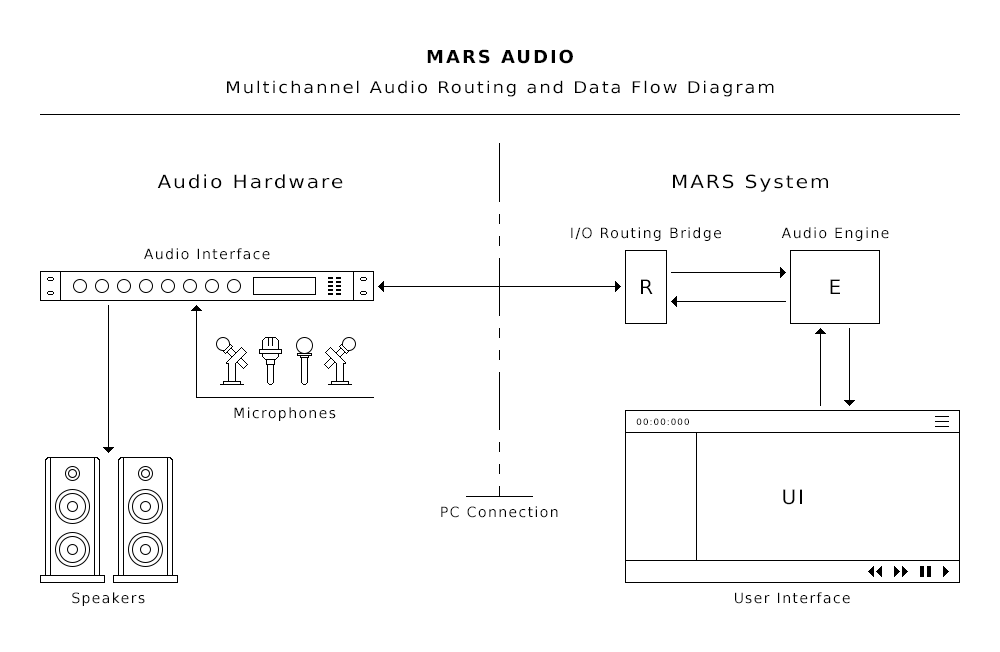
Decoupled System Components
All system components are designed with a modular, decoupled architecture, allowing them to operate in 'standalone mode' as much as possible. This approach enhances overall stability, ensuring uninterrupted system operation even if one component fails. Additionally, the decoupled architecture simplifies troubleshooting, maintenance, and development, as changes to one component do not affect the rest of the system as long as the component's input and output structure remain the same.
© 2026 MARS AUDIO - All rights reserved.